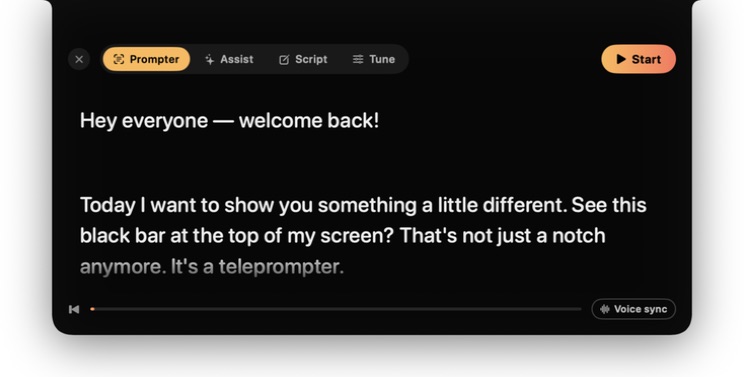
What the free Mac teleprompter includes
Write and save a script, choose Voice sync or Classic scrolling, change text size and reading width, and use global keyboard controls while another app is active. Speech recognition and your script stay on the Mac.
Which Mac teleprompter moves with your voice?
VerbaCue’s free Prompter uses on-device transcription to follow your script as you speak. It waits when you pause, can recover after a small improvisation, and keeps manual controls available. Scripts and transcription stay on the Mac.
How do I use my MacBook as a teleprompter?
Install the signed, notarized app on macOS 14 or later, open Prompter, paste or write your script, choose Voice sync, and grant Microphone and Speech Recognition when macOS asks. Raise the Mac to eye level, keep one or two short lines beside the camera, select the input in System Settings → Sound → Input, and rehearse once with manual controls ready.
Treat capture exclusion as something to verify
VerbaCue can ask macOS to exclude its panel from supported captures, but screen-sharing and recording methods differ. Test the exact Zoom, Meet, Teams, OBS, or recording path before a real event, and share one intended window where practical.
Add Assist only when you want live cues
The optional Pro mode can turn bounded recent conversation text into a concise camera-side cue. Starting Assist for the first time shows the exact data boundary and begins a seven-day, no-card trial with 30 suggestions. The free teleprompter does not start that trial.